Master
Surface roughness from feed and nose radius: the formula and a table
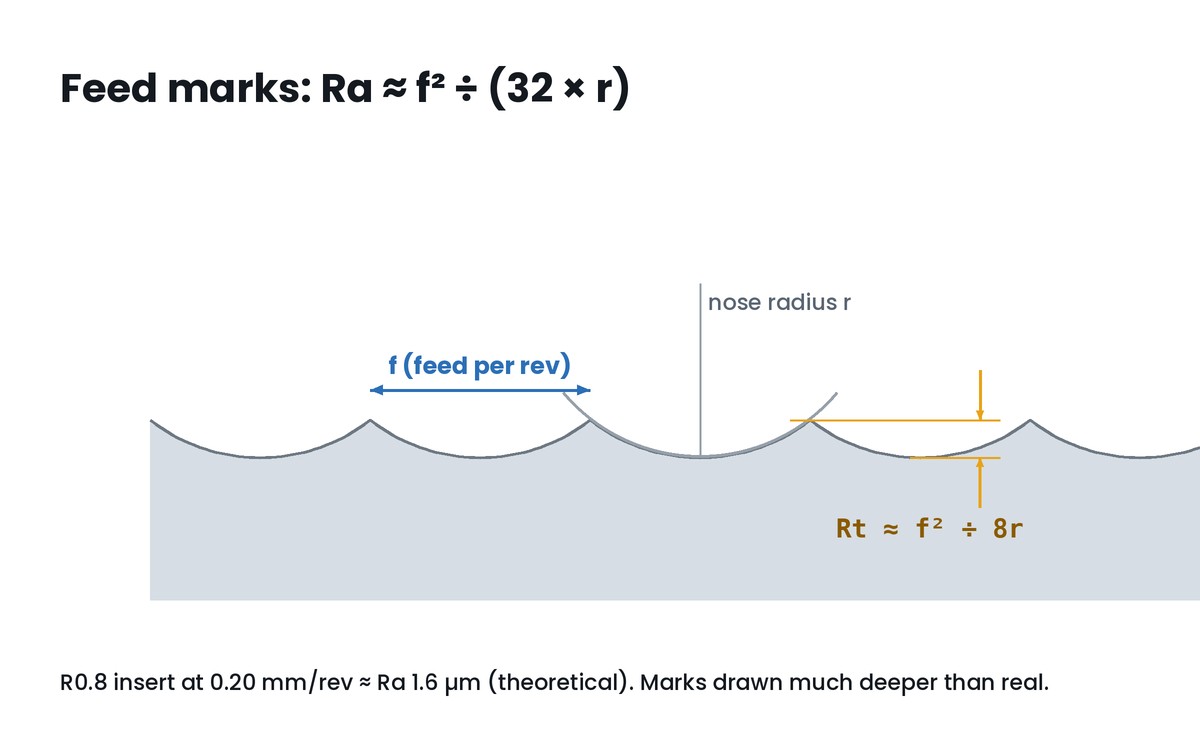
On a lathe, the round nose of the insert leaves a row of small curved marks, one per turn. The feed decides how far apart they are, and the nose radius decides how deep. That gives a simple formula for the finish you can expect.
The formulas
Rt ≈ f² ÷ (8 × r) × 1000    (µm)
Ra ≈ f² ÷ (32 × r) × 1000   (µm)

f = feed, mm/rev
r = nose radius, mm
Rt is the peak-to-valley height of the marks; Ra is the average roughness most drawings ask for. Turned round, the formula gives the feed for a finish:
f ≈ √(Ra × 32 × r ÷ 1000)
Example
The drawing says Ra 1.6 and you have an R0.8 insert:
f = √(1.6 × 32 × 0.8 ÷ 1000)
  = √0.041
  = 0.20 mm/rev
Table: theoretical Ra (µm)
| Feed (mm/rev) | r = 0.4 | r = 0.8 | r = 1.2 |
|---|---|---|---|
| 0.10 | 0.78 | 0.39 | 0.26 |
| 0.15 | 1.76 | 0.88 | 0.59 |
| 0.20 | 3.13 | 1.56 | 1.04 |
| 0.25 | 4.88 | 2.44 | 1.63 |
| 0.30 | 7.03 | 3.52 | 2.34 |
Maximum feed for a finish
| Finish needed | r = 0.4 | r = 0.8 | r = 1.2 |
|---|---|---|---|
| Ra 0.8 (N6) | 0.10 | 0.14 | 0.18 |
| Ra 1.6 (N7) | 0.14 | 0.20 | 0.25 |
| Ra 3.2 (N8) | 0.20 | 0.29 | 0.35 |
Why the real finish is often worse
The formula assumes a perfect cut. On the machine, these all make the surface rougher:
- vibration (long overhang, thin part, worn spindle);
- built-up edge (cutting speed too low, especially in soft steel and aluminium);
- a worn or chipped insert;
- chips rubbing on the finished surface.
A good habit is to start at about 70–80 % of the feed in the table, then raise it while the finish stays within the drawing.
Wiper inserts
A wiper insert has a special flat zone next to the nose that smooths the marks. Tool makers say it can give the same finish at up to about twice the feed, or a better finish at the same feed. The formula above does not apply to wipers: use the maker's table.
The Master CNC app has a surface roughness calculator: enter the feed and nose radius and it shows Ra and Rt. Check the first part with a roughness tester before running the batch.
Calculators, process sheet to program, simulation, codes and lessons. Free to start, no sign-in, on phone and laptop.
Open the app