Master
Taper calculation: angle, ratio and program points
A taper on a drawing can be given as two diameters and a length, an angle, or a ratio. A CNC lathe only needs two points, but you often have to calculate one of them. Here are the formulas with worked examples.
The formulas
Taper ratio  = (D − d) ÷ L
tan(α/2)  = (D − d) ÷ (2 × L)
D − d  = 2 × L × tan(α/2)

D = big diameter, d = small diameter
L = length, α = included angle
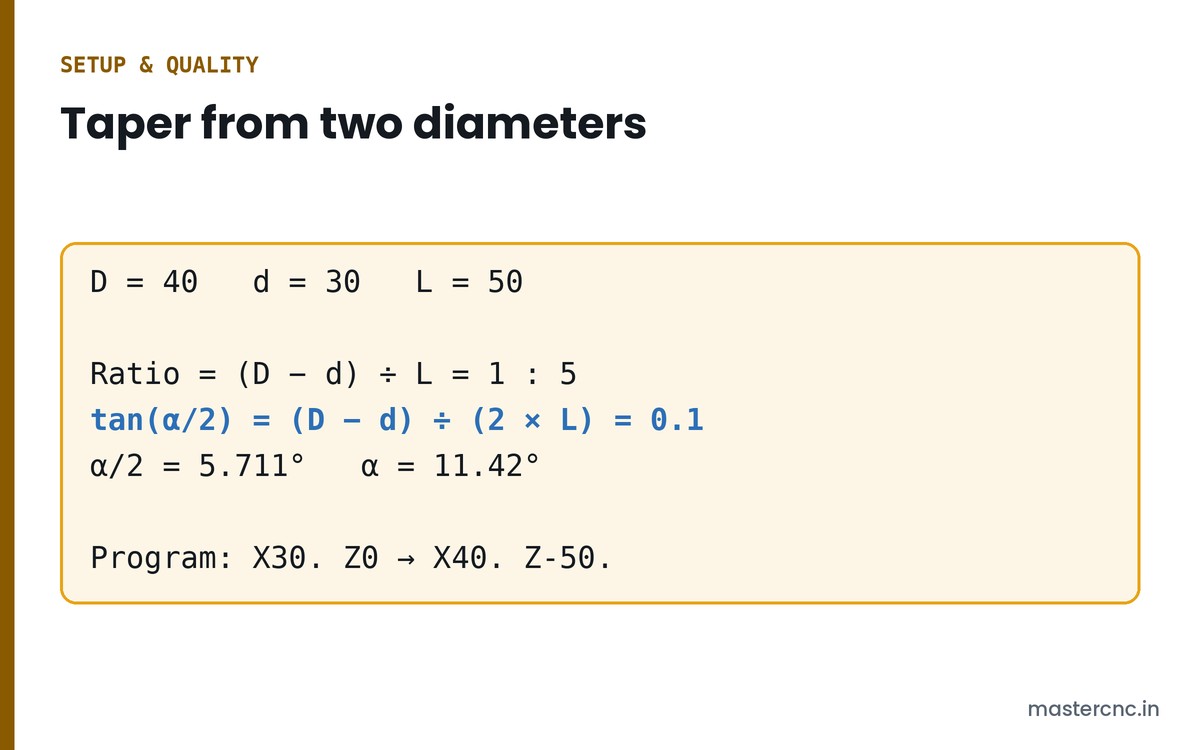
Example 1: two diameters and a length
D = 40, d = 30, L = 50.
Ratio  = 10 ÷ 50 = 1 : 5
tan(α/2) = 10 ÷ 100 = 0.1
α/2  = 5.711°  (included 11.42°)
Program points, small end at the face:
G01 X30. Z0 F0.15
X40. Z-50.
Example 2: an angle and a length
A 15° half angle (30° included) over 20 mm, starting at Ø40:
D − d = 2 × 20 × tan 15°
      = 40 × 0.26795
      = 10.718
small end = 40 − 10.718 = 29.282
Example 3: a ratio
A 1:10 taper over 30 mm with the big end Ø25: D − d = 30 ÷ 10 = 3, so the small end is Ø22.
Do not forget nose radius compensation
On a taper, a tool with a nose radius cuts off the programmed line unless G41/G42 is active: the taper comes out the right angle but the wrong size. See nose radius compensation.
Checking a taper
- Measure both diameters at known Z positions with a micrometer.
- Use a taper ring or plug gauge with marking blue for fits like machine tapers.
- A sine bar and gauge blocks give the angle on a surface plate.
Common mistakes
- Using the included angle in a half-angle formula: the taper doubles.
- Calculator in radians instead of degrees.
- Rounding the small diameter too early.
The Master CNC app has a taper calculator for angle, ratio and diameters. Machine tapers (Morse, metric) have their own standard sizes: use the standard's table.
Calculators, process sheet to program, simulation, codes and lessons. Free to start, no sign-in, on phone and laptop.
Open the app