Master
Fanuc G71 Type II: roughing profiles with pockets
The basic G71 (Type I) only works when the profile keeps getting bigger in X as it goes towards the chuck. Many parts have a pocket or undercut where the diameter goes down and then up again. G71 Type II roughs those too.
Type I or Type II?
- Type I: the first profile block (N10) moves only in X. The profile must be one-way in X and in Z.
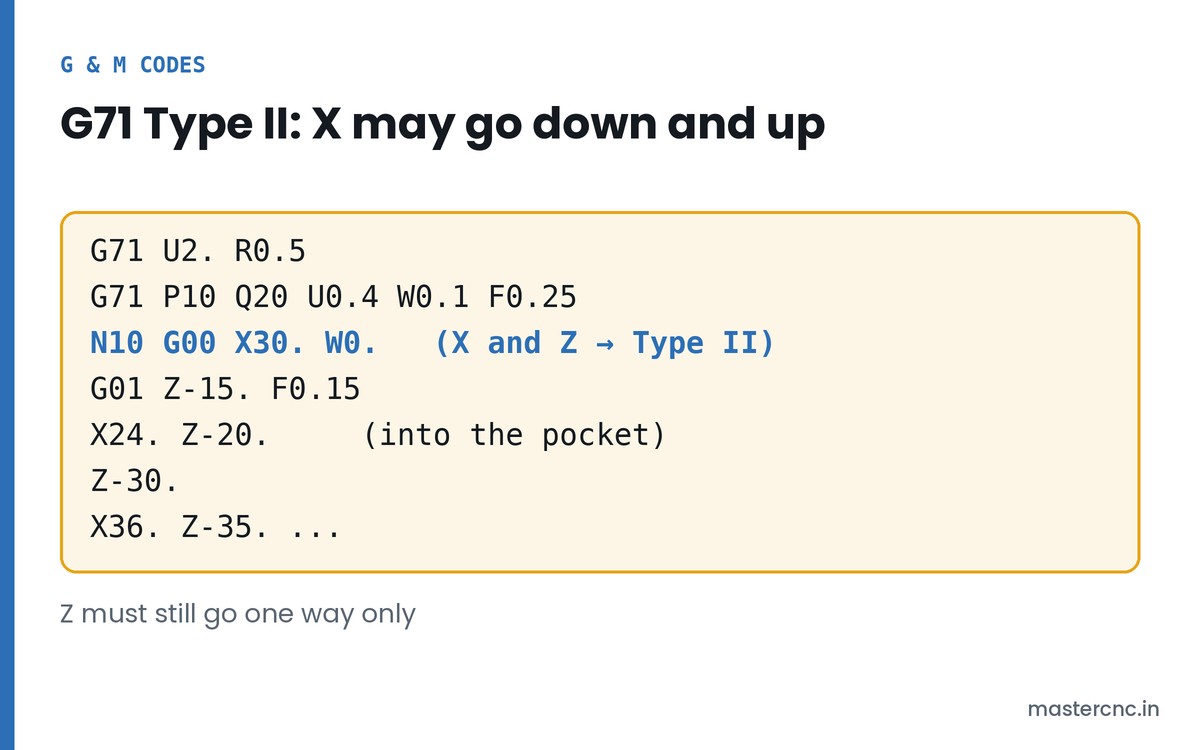
- Type II: the first profile block has both X and Z (Z can be W0, zero movement). X may go up and down; Z must still go one way only.
Type II is standard on many current Fanuc lathes and an option on some older ones. See the basic G71 and G70 program first if G71 is new to you.
Example: a diameter with a pocket
A Ø40 bar. Ø30 for 15 mm, a cone down into a Ø24 pocket, then up to Ø36.
T0101  (VNMG / 35° insert)
G50 S2500
G96 S180 M03
G00 X42. Z2. M08
G71 U2. R0.5
G71 P10 Q20 U0.4 W0.1 F0.25
N10 G00 X30. W0.
G01 Z-15. F0.15
X24. Z-20.
Z-30.
X36. Z-35.
Z-50.
N20 X42.
G70 P10 Q20
G00 X150. Z100. M09
The roughing passes follow the outside first, then go down into the pocket. G70 finishes the whole profile.
Choose a tool that fits the pocket
To cut the slope down into the pocket, the back of the insert must clear the part. A 35° insert (VNMG, VBMT) on a holder with enough back clearance reaches into most undercuts; an 80° CNMG usually does not. Check the angle of every slope against the holder's back clearance, or the simulator will show the tool rubbing the wall.
Common mistakes
- Only X in N10: the control treats it as Type I and raises an alarm at the pocket.
- Z going back on itself (a real groove with two walls): Type II cannot do that. Use a grooving tool or G73.
- Insert without back clearance for the slope.
- Assuming Type II exists: check your control.
Simulate Type II profiles before cutting: the simulator shows each roughing pass. For castings with pockets, G73 may be the better cycle.
Calculators, process sheet to program, simulation, codes and lessons. Free to start, no sign-in, on phone and laptop.
Open the app