Master
Finding a bore centre with a touch probe on a VMC
A spindle probe touches a bore at four points, calculates the centre and diameter, and can write the centre straight into G54. It is faster and more repeatable than an edge finder, and it does not depend on the operator's eye.
What the probe does
- Moves down into the bore to the measuring depth.
- Touches the wall in +X, −X, +Y and −Y.
- Calculates the centre and the diameter.
- Writes the centre into the work offset you choose, and stores the results in variables.
A typical probing call
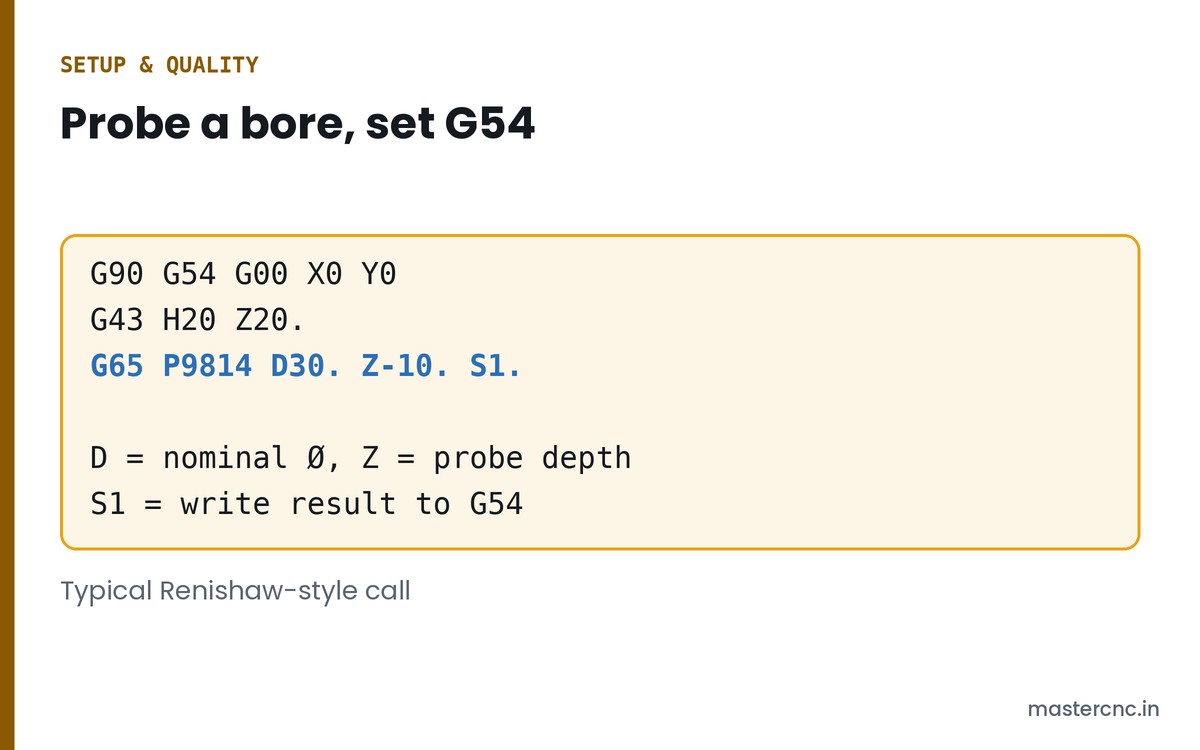
Probe software comes as macro programs. A widely used example is Renishaw Inspection Plus, where the bore and boss cycle looks like this:
G90 G54 G00 X0 Y0  (roughly over the bore)
G43 H20 Z20.  (probe length offset)
G65 P9810 Z5. F1000.  (protected move down)
G65 P9814 D30. Z-10. S1.
G65 P9810 Z20.  (protected move up)
- D30. nominal bore diameter.
- Z-10. measuring depth.
- S1. update G54 with the measured centre.
Macro numbers and letters depend on the probe maker and the software version. Use the manual that came with your probe.
Before you trust it: calibrate
The probe stylus ball has a size and an offset from the spindle centre. Calibrate it on a ring gauge or a known bore after fitting the probe, after a crash, and at regular intervals. A probe that is not calibrated finds the wrong centre every time.
Without a probe: dial test indicator
- Clamp a dial test indicator in the spindle (in a holder, not on the tool), with the tip on the bore wall.
- Turn the spindle by hand (spindle in neutral), reading at four points: front, back, left, right.
- Move X until left and right read the same, then Y until front and back read the same.
- Enter
X0andY0on the G54 page with [MEASURE].
Slower, but accurate to a few microns with care.
Common mistakes
- Probing with the spindle turning. The probe must not rotate during measurement unless the maker says so.
- Wrong nominal D: the probe moves too far or not far enough.
- Dirty bore or chips on the wall.
- Forgetting G43 on the probe: Z depths are wrong.
For the edge finder method, see setting a work offset with an edge finder.
Calculators, process sheet to program, simulation, codes and lessons. Free to start, no sign-in, on phone and laptop.
Open the app